Set up the Notify Bot
Important
Make sure your Mattermost Server enables Integrations, Bot Accounts, and Access Tokens. Also make sure that your user account has the privileges to create a bot account. This documentation does not cover how to set up a Mattermost server! Please refer to the Mattermost documentation for more information.
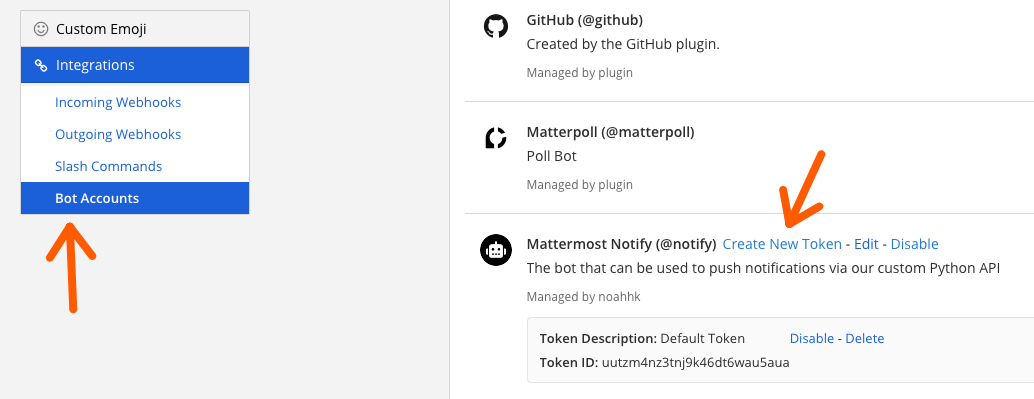
Go to Main Menu -> Integrations -> Bot Accounts.

Click on Add Bot Account (upper right corner of the screen).
Fill in the Username and Display Name fields.
Username: notify (use this name!)
Display Name: Notify Bot (or any name you like)
Description: Notify Bot for mattermost-notify (or any description you like)
Role: Member (or any role you like, but no special privileges are needed)
At least post:channels is required but post:all is recommended to also allow direct messages.

Click on Create Bot Account (bottom right corner).
Copy the Token and save it in a safe place (you will need it later).
Important
The Token is a secret key that allows the Mattermost-Notify client to sign into the Bot account. Since Mattermost-Notify is designed to work with one Bot account per server, this key should be accessible to all members of your team who need to use the Notify Bot.
If you forget the token or have security concerns, you can always generate new tokens using the Create New Token button on the Bot Accounts page.
Add the Bot to a Team
The Notify Bot will need to be added to your team in order to send messages. To do this:
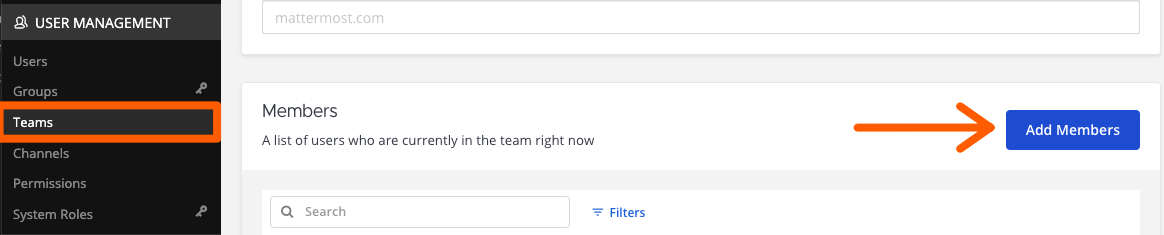
Go to System Console -> User Management -> Teams -> <select your team> -> Add Members -> <add the bot account>.
Add the Bot to any private channels that you want it to post in (public channels should work automatically).
Note
If you do not see the System Console option (or an alternative setting that allows you to manage teams) the your account likely is missing the right permissions. Please contact your Mattermost server administrator.